
How Review Insights Uses AI #
Review Insights uses artificial intelligence to analyze every customer review collected through your ReviewScanGo campaigns. Instead of looking at reviews one at a time, the AI examines your entire collection of customer feedback to identify recurring themes, customer sentiment, product issues, strengths, feature requests, and business opportunities.
Each review is analyzed independently, then combined with every other review to produce a comprehensive picture of how customers feel about your product.
The AI is designed to help you discover patterns that would be difficult and time-consuming to identify manually.
AI Confidence #
Nearly every insight in Review Insights includes an AI Confidence score.
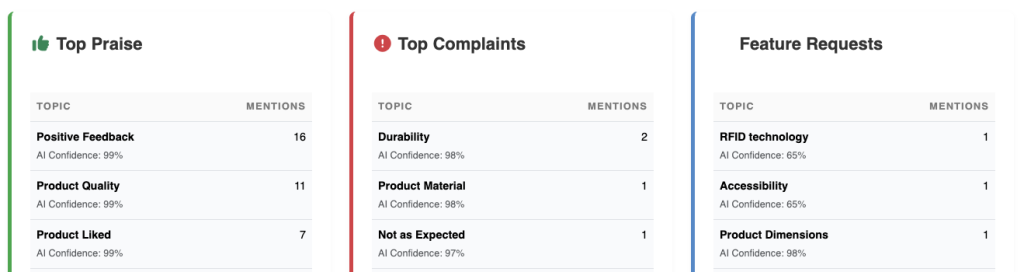
This score represents how confident the AI is that a particular conclusion accurately reflects customer feedback.
Higher confidence generally means:
- More customers discussed the topic
- Customers described it consistently
- The AI found little conflicting evidence
Lower confidence may indicate:
- Only a few reviews mention the topic
- Customers have mixed opinions
- Additional reviews are needed before drawing conclusions
Confidence Levels #
| AI Confidence | Meaning |
|---|---|
| 95–100% | Very high confidence |
| 85–94% | High confidence |
| 70–84% | Moderate confidence |
| Below 70% | Limited evidence—review manually |
Confidence measures how certain the AI is about a finding, not how important the finding is.
Sentiment Analysis #
Sentiment measures whether customers express positive, neutral, or negative opinions about your product.
Positive #
Customers are satisfied and generally recommend the product.
Examples include:
- “Excellent quality.”
- “Works perfectly.”
- “Highly recommend.”
Neutral #
Customers neither strongly praise nor criticize the product.
Examples include:
- “It works as expected.”
- “Average product.”
- “Nothing special.”
Negative #
Customers express dissatisfaction or frustration.
Examples include:
- “Stopped working.”
- “Very disappointing.”
- “Would not buy again.”
Overall sentiment is calculated across all analyzed reviews and displayed throughout the dashboard.
Emotion Detection #
Beyond positive or negative sentiment, the AI also identifies the emotional tone of customer feedback.
Common emotions include:
- Satisfied
- Happy
- Excited
- Frustrated
- Disappointed
- Confused
- Cautious
- Neutral
- Tentative
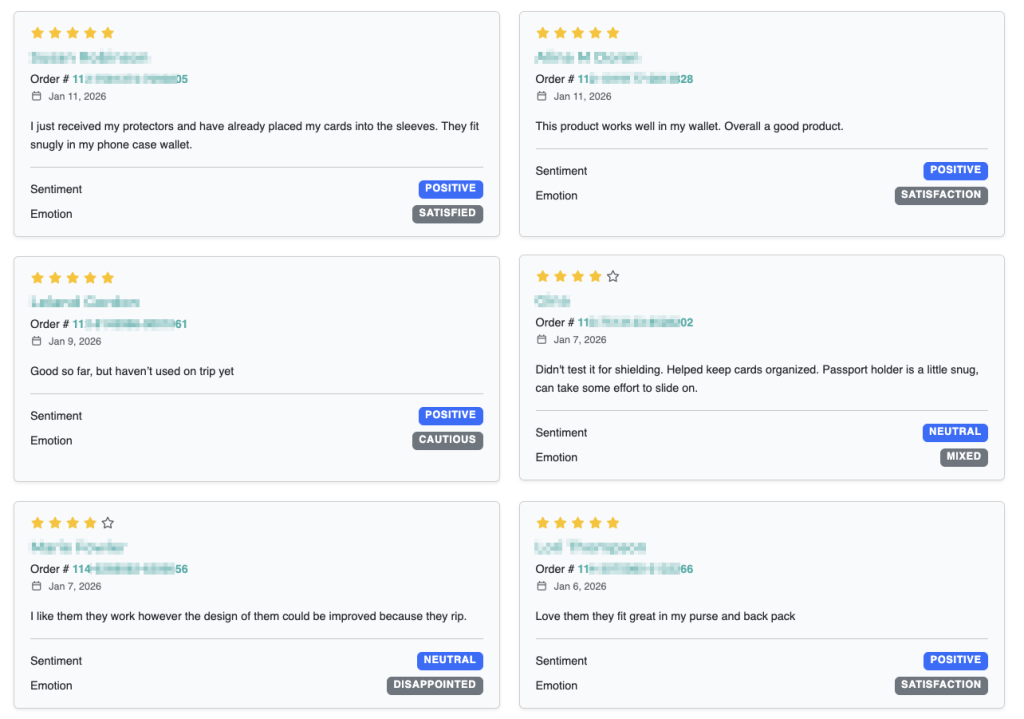
Understanding customer emotions often provides additional context that star ratings alone cannot.
For example, two customers may both leave four-star reviews, but one may sound enthusiastic while the other expresses hesitation about certain features.
Average Rating #
Average Rating is calculated directly from the customer star ratings.
Review Insights combines rating information with AI analysis to better understand why customers gave those ratings.
For example:
- A product may have a 4.8-star average but recurring complaints about packaging.
- Another product may have a lower rating because of one specific issue affecting many customers.
The AI helps explain the reasons behind the ratings.
Product Health #
Product Health is a proprietary score that summarizes the overall condition of your product based on customer feedback.
The score considers multiple factors, including:
- Overall sentiment
- Average rating
- Frequency of complaints
- Severity of recurring issues
- Product strengths
- AI confidence
Higher Product Health scores generally indicate a healthier customer experience and fewer recurring problems.
Opportunity Score #
The Opportunity Score estimates the potential business impact of addressing a specific customer issue.
Rather than focusing only on the most common complaint, the AI prioritizes improvements that are likely to have the greatest effect on customer satisfaction and business performance.
Opportunity Scores consider factors such as:
- Number of affected customers
- Average rating associated with the issue
- AI confidence
- Estimated business impact
- Severity of customer frustration
Higher Opportunity Scores indicate higher-priority improvements.
Business Impact #
Each opportunity includes a Business Impact category that estimates how resolving the issue could affect your business.
Examples include:
- Customer Satisfaction
- Conversion Rate
- Product Quality
- Returns Reduction
- Customer Retention
- Brand Perception
- Average Order Value
These estimates help prioritize work based on potential outcomes rather than complaint volume alone.
Topic Detection #
The AI automatically groups similar customer comments into topics.
Instead of treating phrases like:
- “Battery dies quickly”
- “Battery doesn’t last long”
- “Needs better battery life”
as separate complaints, Review Insights recognizes they all describe the same underlying issue.
This allows the dashboard to identify recurring themes even when customers use different wording.
Topic Matrix #
The Topic Matrix organizes identified topics into categories such as:
- Product strengths
- Customer concerns
- Feature requests
- Marketing opportunities
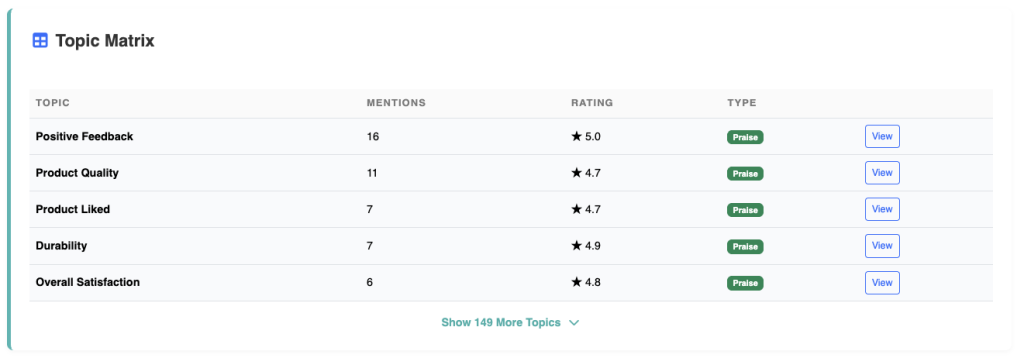
Each topic includes useful information including:
- Number of mentions
- Average rating
- AI confidence
- Topic classification
This provides a quick overview of the issues and strengths that appear most frequently.
Executive Summary #
The Executive Summary is generated after analyzing all available reviews for a product.
Rather than listing every complaint individually, it summarizes the most important findings, including:
- Overall customer satisfaction
- Product strengths
- Common concerns
- Emerging trends
- Recommended priorities
- Highest-impact opportunities
The summary is designed to help you understand the overall state of your product in just a few minutes.
Recommendations #
Recommendations are generated from the patterns identified across your reviews.
These suggestions are intended to help improve:
- Product design
- Packaging
- Product listings
- Images
- Marketing copy
- Customer expectations
- Future product versions
Recommendations should be treated as guidance rather than instructions. The best results come from combining AI insights with your own product knowledge and customer research.
Why AI Findings May Change #
As new reviews are collected, Review Insights continuously updates its analysis.
You may notice changes such as:
- New topics appearing
- Opportunity Scores increasing or decreasing
- AI Confidence improving
- Sentiment trends shifting
- New recommendations being generated
This is expected behavior. Larger datasets provide more reliable insights and allow the AI to identify new trends as customer feedback evolves.
Best Practices #
To get the most accurate results:
- Collect as many authentic customer reviews as possible.
- Analyze products regularly as new reviews arrive.
- Pay attention to recurring themes rather than isolated comments.
- Prioritize improvements with high Opportunity Scores and high AI Confidence.
- Use Review Explorer to inspect the original customer reviews behind any AI finding.
- Combine AI insights with your own product expertise and marketplace knowledge.
Read Next: Overview Dashboard