
The Overview Dashboard provides a high-level summary of your product’s performance based on customer reviews analyzed by Review Insights.
Instead of reading individual reviews, the Overview Dashboard highlights the most important metrics, customer trends, and AI recommendations in one place.
This page is designed to answer questions like:
- How satisfied are my customers?
- What is my biggest product issue?
- What should I improve first?
- How healthy is my product overall?
- What actions will have the greatest business impact?
For a deeper analysis, you can navigate to the Customer Feedback, Opportunities, and Review Explorer tabs.
Product Summary #
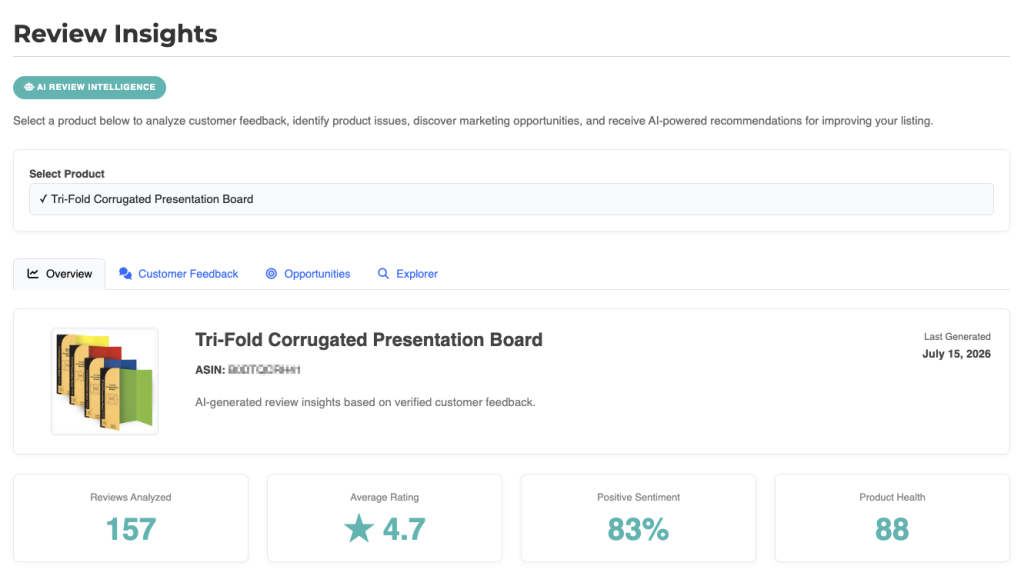
At the top of the dashboard you’ll see basic information about the selected product.
This section includes:
- Product image
- Product name
- ASIN
- Date the report was last generated
The report is automatically updated whenever a new AI summary is generated.
Review Statistics #
Below the product summary you’ll find several key performance metrics.
Reviews Analyzed #
Displays the total number of customer reviews included in the current analysis.
As more reviews are collected, the AI gains additional context and can identify trends with greater confidence.
Average Rating #
Shows the average customer star rating across all analyzed reviews.
This metric provides a quick indication of overall customer satisfaction.
Positive Sentiment #
Shows the percentage of reviews classified as positive by the AI.
Unlike the star rating, sentiment measures the language customers use rather than just the rating they selected.
Product Health #
Product Health is an overall score representing the condition of your product based on customer feedback.
The score considers multiple factors including:
- Customer sentiment
- Average rating
- Recurring complaints
- Product strengths
- AI confidence
- Severity of customer issues
Higher Product Health scores generally indicate fewer recurring issues and stronger customer satisfaction.
Executive Summary #

The Executive Summary provides a concise overview of your product based on every analyzed review.
Rather than listing every individual comment, the AI summarizes:
- Overall customer satisfaction
- Common strengths
- Recurring concerns
- Emerging customer trends
- Priority improvement areas
- Business opportunities
Reading the Executive Summary is the fastest way to understand how customers currently perceive your product.
Biggest Opportunity #
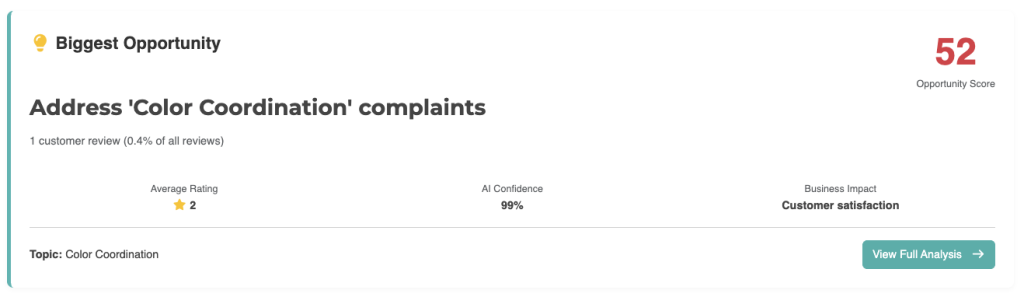
One of the most valuable sections of the dashboard is Biggest Opportunity.
This identifies the single improvement that is expected to have the greatest impact on customer satisfaction and business performance.
Each opportunity includes:
- Opportunity title
- Opportunity Score
- Average rating of affected reviews
- AI Confidence
- Business Impact
- Number of customer reviews mentioning the issue
Rather than focusing only on the most common complaint, the AI prioritizes improvements that are likely to produce meaningful results.
Opportunity Score #
The Opportunity Score estimates the potential value of resolving the identified issue.
The score is based on factors such as:
- Frequency of customer mentions
- Customer ratings
- AI confidence
- Severity of the issue
- Expected business impact
Higher Opportunity Scores indicate improvements that should generally receive higher priority.
Business Impact #
Each opportunity includes an estimated Business Impact.
Examples include:
- Customer Satisfaction
- Conversion Rate
- Product Quality
- Returns Reduction
- Customer Retention
- Brand Reputation
These estimates help you understand why the AI selected a particular recommendation.
Top Priority Actions #
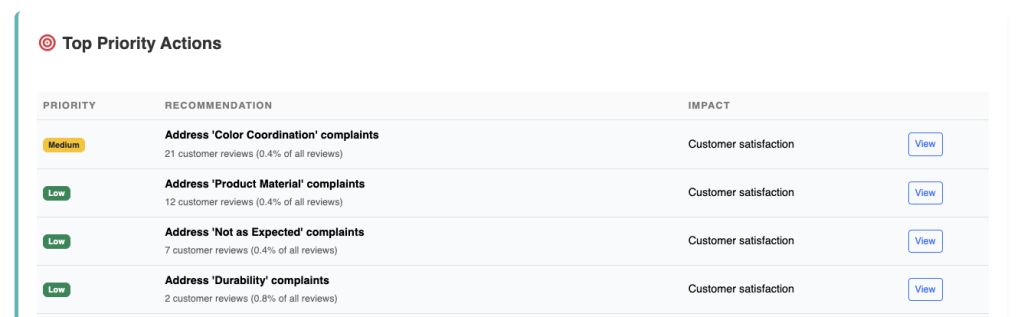
The Top Priority Actions table lists the highest-impact recommendations identified across all analyzed reviews.
Each recommendation includes:
- Priority level
- Suggested improvement
- Number of supporting customer reviews
- Business impact
- Link to view the full analysis
This section helps you decide where to focus your time and resources first.
Viewing an Opportunity #
Selecting View next to any recommendation opens the complete opportunity analysis.
The detailed report includes:
- Opportunity Score
- Customer evidence
- Supporting reviews
- AI reasoning
- Recommended action plan
- Expected business outcomes
This allows you to understand not only what should be improved, but why the AI considers it important.
Understanding Priorities #
Not every customer complaint deserves the same level of attention.
Review Insights classifies recommendations into priority levels based on their expected impact.
High Priority #
These issues are likely affecting customer satisfaction, ratings, or sales and should be addressed as soon as possible.
Medium Priority #
These issues have noticeable customer impact but may not require immediate action.
Low Priority #
These are less common concerns or improvements that can be considered during future product updates.
Best Practices #
To get the most value from the Overview Dashboard:
- Review the Executive Summary first.
- Monitor your Product Health score over time.
- Focus on high Opportunity Scores before smaller issues.
- Read the supporting evidence before making product changes.
- Use Customer Feedback to understand the underlying customer sentiment.
- Open the full Opportunity analysis before implementing major product updates.
When Should You Check the Dashboard? #
Review the Overview Dashboard regularly, especially:
- After collecting a significant number of new reviews.
- Before launching a new product version.
- Before updating your Amazon listing.
- After making product improvements.
- Before planning marketing campaigns.
- When customer ratings begin to change.
Monitoring the dashboard over time helps you identify trends early and measure whether your improvements are having the desired effect.
Read Next: Customer Feedback