
The Customer Feedback tab provides a detailed analysis of what customers are saying about your product.
While the Overview Dashboard summarizes your product’s performance, the Customer Feedback tab explores the details behind those results by identifying customer sentiment, recurring topics, strengths, concerns, and opportunities for improvement.
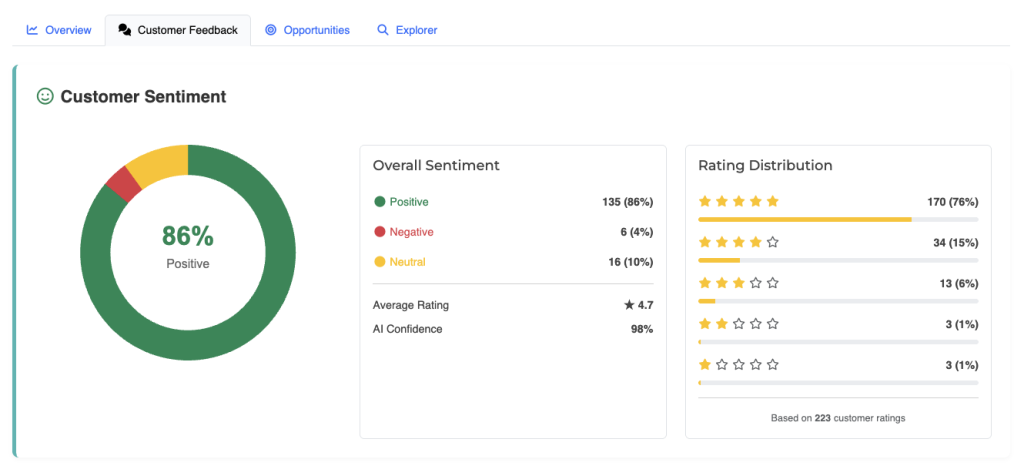
This section helps answer questions such as:
- What do customers love most?
- What problems occur most frequently?
- Which features should be improved?
- How do customers describe my product?
- What messaging should I use in my marketing?
Overall Sentiment #
Overall Sentiment measures how customers feel about your product based on the language used in their reviews.
Rather than relying only on star ratings, Review Insights evaluates the actual words and phrases customers use to determine whether their overall experience is positive, neutral, or negative.
A strong positive sentiment generally indicates satisfied customers, while increasing negative sentiment may highlight emerging product issues.
Monitoring sentiment over time helps you understand whether customer satisfaction is improving or declining.
Rating Distribution #
The Rating Distribution chart shows how customer ratings are spread across all analyzed reviews.
This allows you to quickly identify patterns such as:
- A large number of five-star reviews
- An unusual increase in one or two-star reviews
- Products with polarized customer opinions
- Improvements or declines in customer satisfaction over time
When reviewing this chart, compare the distribution with the Overall Sentiment score. In some cases, customers may leave high ratings while still mentioning product improvements.
Topic Matrix #
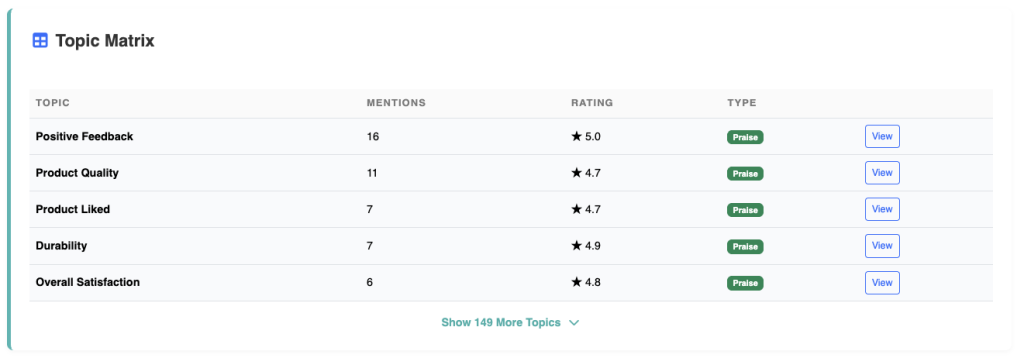
The Topic Matrix organizes customer feedback into meaningful topics identified by the AI.
Instead of treating every review individually, Review Insights groups similar comments together to identify recurring themes.
Each topic includes valuable information such as:
- Number of mentions
- Average customer rating
- AI confidence
- Topic category
This makes it easy to identify the subjects customers discuss most often.
Top Strengths #
Top Strengths highlight the aspects of your product that customers consistently praise.
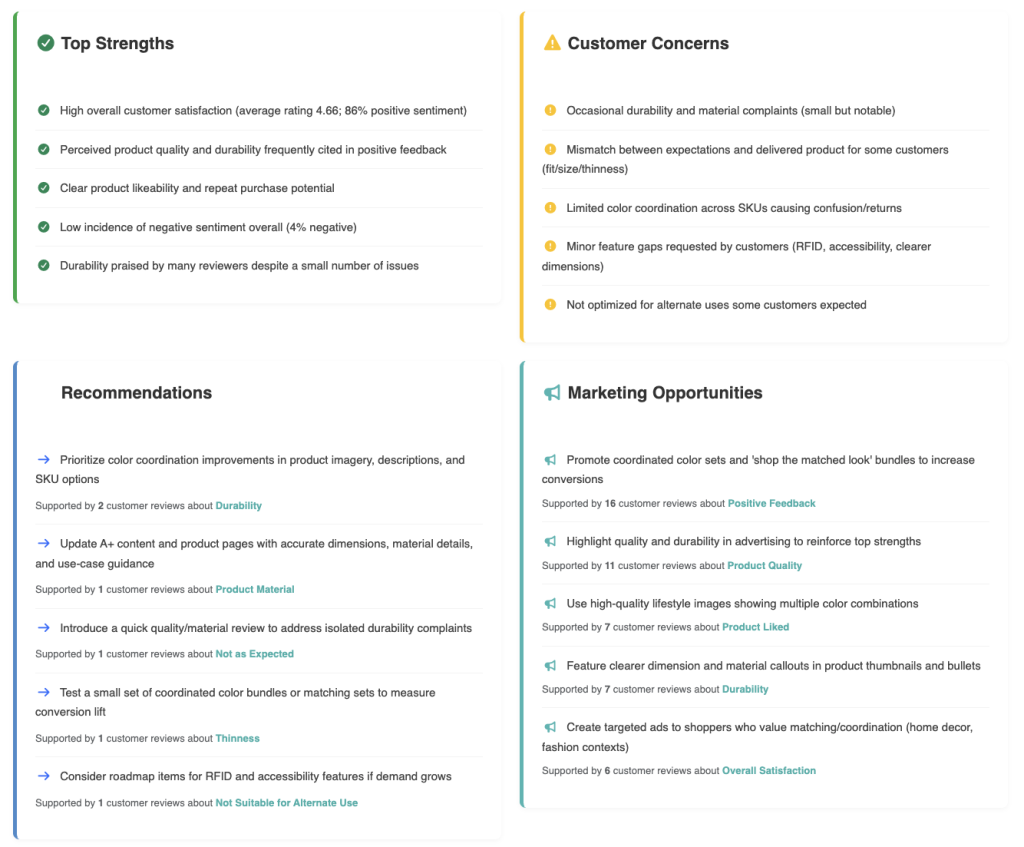
These may include:
- Product quality
- Ease of use
- Durability
- Packaging
- Design
- Performance
- Value for money
- Customer experience
Understanding your strengths helps you reinforce what customers already appreciate and use those benefits in your product listings and marketing materials.
Customer Concerns #
Customer Concerns identify recurring issues that negatively affect customer satisfaction.
Examples may include:
- Product defects
- Poor durability
- Missing accessories
- Packaging damage
- Difficult assembly
- Confusing instructions
- Performance issues
Recurring concerns often represent the greatest opportunities for product improvement.
Recommendations #
Recommendations are AI-generated suggestions based on patterns identified across all customer reviews.
Recommendations may involve:
- Product improvements
- Packaging changes
- Quality control
- Documentation updates
- Listing improvements
- Customer expectation management
Recommendations are prioritized based on customer feedback and estimated business impact.
Marketing Opportunities #
Customers often describe products using language that resonates naturally with other buyers.
Review Insights identifies these recurring phrases and themes as Marketing Opportunities.
These insights can help improve:
- Amazon product titles
- Bullet points
- Product descriptions
- Images
- A+ Content
- Advertising copy
- Social media campaigns
- Website content
Using customer language often produces more authentic and persuasive marketing.
Top Praise #
The Top Praise section highlights the compliments customers mention most frequently.
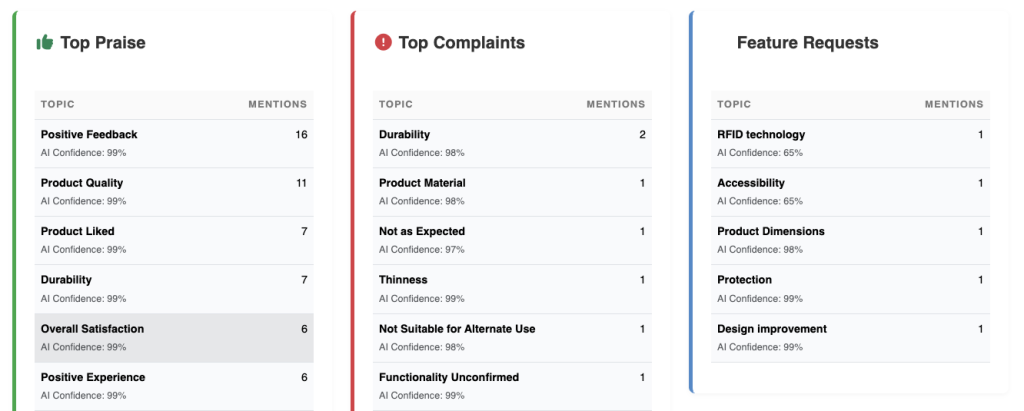
Examples may include:
- Excellent build quality
- Fast shipping
- Great value
- Easy installation
- Attractive appearance
- Reliable performance
Products with consistent praise in certain areas should continue emphasizing those strengths in future product versions and marketing campaigns.
Top Complaints #
Top Complaints identifies the most common negative feedback across all analyzed reviews.
Unlike isolated customer issues, these complaints appear repeatedly throughout your review history.
Examples include:
- Battery life
- Packaging damage
- Poor instructions
- Missing components
- Product reliability
- Size inconsistencies
Recurring complaints deserve closer investigation because they often represent systemic issues affecting many customers.
Feature Requests #
Feature Requests identify improvements customers would like to see in future versions of your product.
Examples include:
- Additional sizes
- More color options
- Improved accessories
- New functionality
- Better packaging
- Easier setup
- Additional compatibility
Feature requests can help guide future product development and differentiate your products from competitors.
Voice of the Customer #
Voice of the Customer summarizes how customers naturally describe your product.
Instead of creating marketing language from scratch, this section highlights the phrases, benefits, and descriptions customers consistently use themselves.
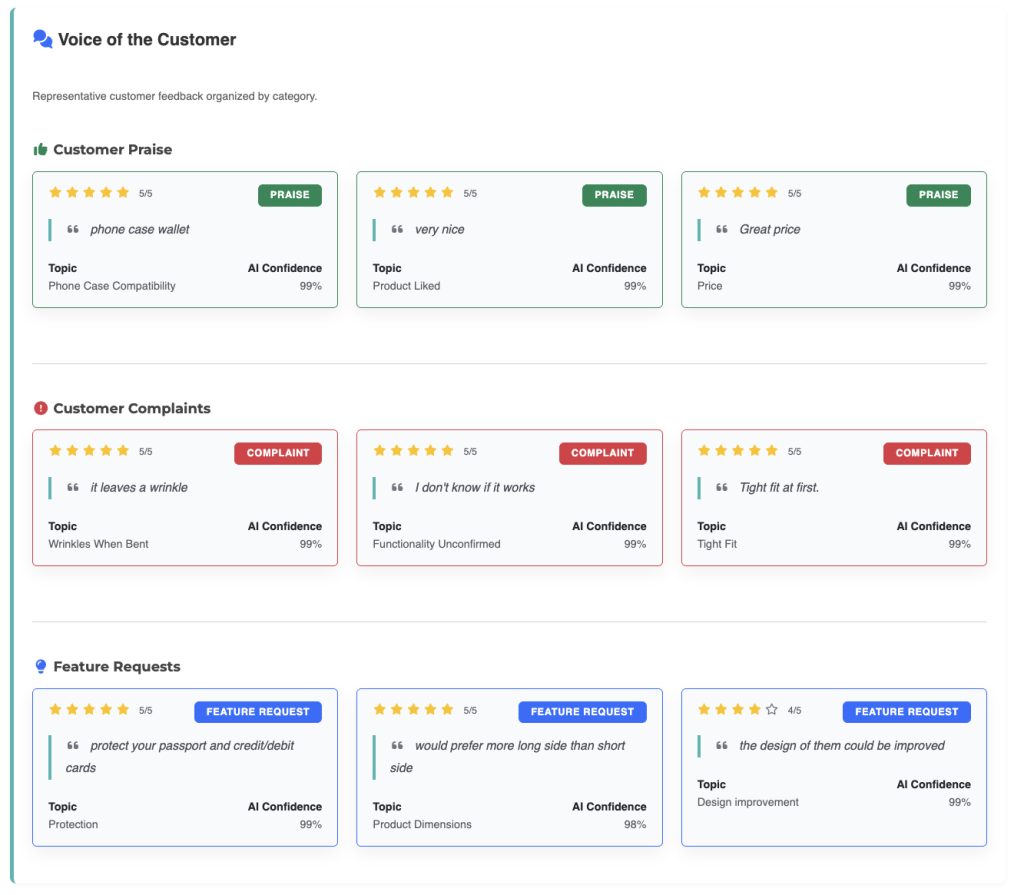
Examples may include:
- “Very easy to install”
- “Worth every penny”
- “Looks premium”
- “Much better than expected”
These insights can improve product listings, advertising, email campaigns, and website copy while ensuring your messaging reflects real customer experiences.
Using Customer Feedback Effectively #
The Customer Feedback tab is most valuable when viewed as a complete picture rather than focusing on individual comments.
A recommended workflow is:
- Review the Overall Sentiment.
- Examine the Rating Distribution.
- Identify recurring topics in the Topic Matrix.
- Compare Top Strengths with Customer Concerns.
- Review AI Recommendations.
- Explore Marketing Opportunities.
- Read the supporting reviews in Review Explorer.
This process helps you understand not only what customers are saying, but why they are saying it.
Best Practices #
To get the most value from the Customer Feedback tab:
- Focus on recurring patterns rather than isolated reviews.
- Prioritize issues mentioned by many customers.
- Compare strengths and concerns together to understand overall customer perception.
- Use customer language in your product listings and advertising.
- Review new feedback regularly as additional reviews are collected.
- Verify important findings by reading the original customer reviews in Review Explorer.
Read Next: Opportunities