
The Review Explorer allows you to browse every customer review that contributed to your Review Insights reports.
While the Overview, Customer Feedback, and Opportunities tabs summarize customer feedback, Review Explorer gives you direct access to the individual reviews behind every AI insight.
Use Review Explorer whenever you want to verify recommendations, investigate specific customer concerns, or better understand the context behind an AI finding.
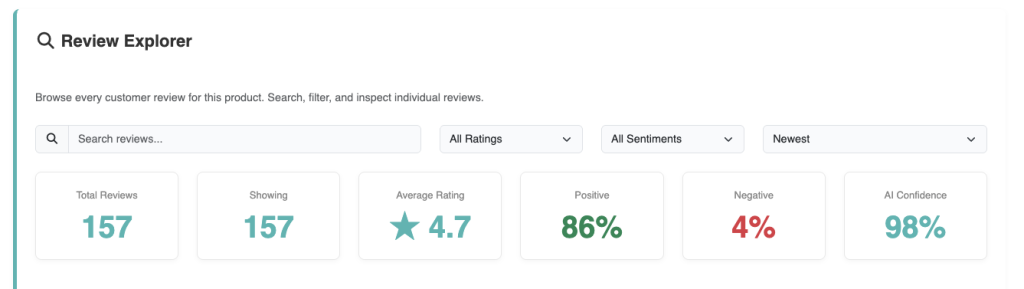
Searching Reviews #
The search bar allows you to quickly find reviews containing specific words or phrases.
You can search for:
- Product features
- Materials
- Components
- Customer concerns
- Common complaints
- Positive feedback
- Keywords related to a specific issue
For example, you might search for:
- Battery
- Packaging
- Instructions
- Quality
- Shipping
- Warranty
- Assembly
Searching reviews makes it easy to investigate recurring topics without reading every review individually.
Filtering Reviews #
Review Explorer includes several filters that help narrow the results.
Depending on your report, you can filter reviews by:
- Star rating
- Customer sentiment
- AI classification
- Review topic
- Date
- Product
Filtering allows you to focus on the specific reviews most relevant to your investigation.
For example, you may choose to view only negative reviews or only reviews mentioning a particular feature.
Sorting Results #
Reviews can also be sorted to help you analyze customer feedback more efficiently.
Common sorting options include:
- Newest first
- Oldest first
- Highest rating
- Lowest rating
- Most relevant
Changing the sort order often helps identify recent trends or recurring issues over time.
Understanding Review Cards #
Each review contains several pieces of information that help you understand both the customer’s feedback and the AI’s analysis.
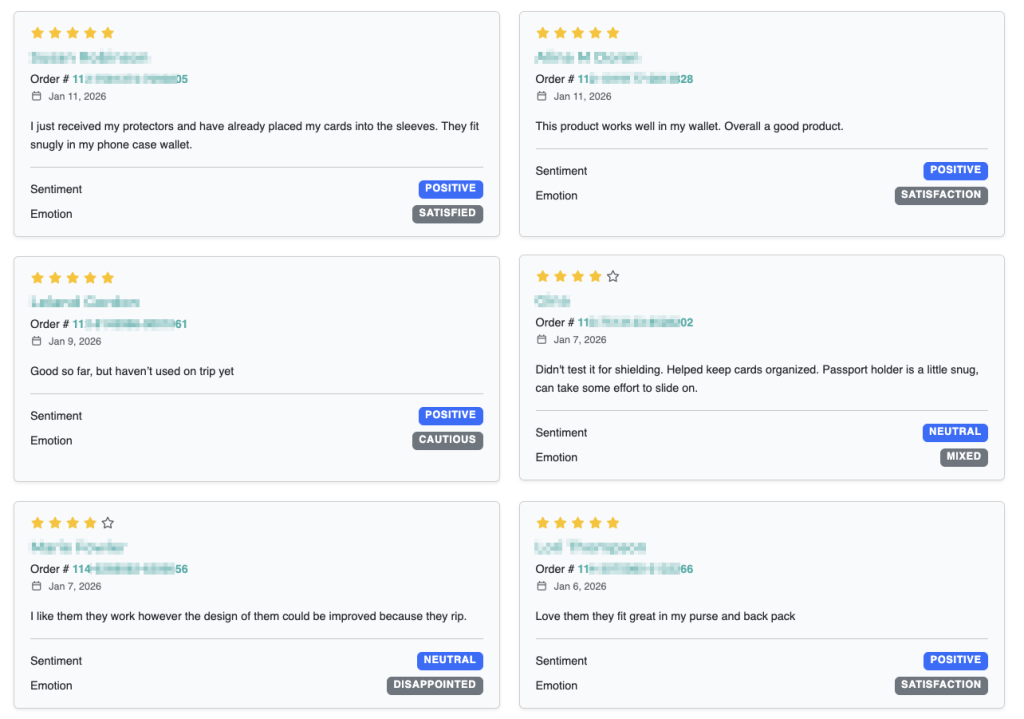
A review card may include:
- Customer rating
- Review date
- Customer review text
- AI sentiment
- Detected emotion
- Identified topics
- Product features mentioned
Together, these details provide additional context that may not be visible in summary reports.
AI Sentiment #
Every review is assigned an AI sentiment classification.
Possible values include:
- Positive
- Neutral
- Negative
Sentiment is based on the language used throughout the review rather than the star rating alone.
For example, a customer may leave a five-star review while still mentioning a packaging issue. Likewise, a four-star review may contain overwhelmingly positive feedback with only a minor suggestion.
Customer Emotions #
Review Explorer also identifies the emotional tone of each review.
Examples include:
- Happy
- Satisfied
- Excited
- Frustrated
- Disappointed
- Confused
- Neutral
Understanding customer emotions provides additional insight into how customers actually feel beyond simple positive or negative classifications.
Topics #
The AI automatically detects the primary topics discussed within each review.
Examples include:
- Battery life
- Build quality
- Packaging
- Ease of use
- Instructions
- Appearance
- Durability
- Customer service
Topics help connect individual reviews with the broader trends shown throughout Review Insights.
Verifying AI Insights #
One of the most valuable uses of Review Explorer is validating AI recommendations.
If Review Insights identifies:
- A recurring complaint
- A feature request
- A marketing opportunity
- A product strength
you can immediately locate the supporting reviews to understand exactly why the AI reached that conclusion.
This transparency helps you make business decisions with confidence.
Investigating Customer Issues #
When a new issue appears in your reports, Review Explorer allows you to investigate it in detail.
A good workflow is:
- Open the Opportunities tab.
- Identify the recommendation you want to investigate.
- Open Review Explorer.
- Search for the affected topic.
- Read multiple supporting reviews.
- Look for recurring patterns rather than isolated opinions.
Reading several related reviews often reveals underlying causes that may not be obvious from a single comment.
Finding Customer Quotes #
Review Explorer is an excellent place to discover authentic customer language.
You can identify phrases customers naturally use when describing your product, including:
- Benefits they value
- Problems they encounter
- Emotional reactions
- Purchase motivations
- Comparisons with competing products
These insights can improve:
- Product listings
- Advertising
- Website copy
- Email marketing
- Social media content
Using real customer language often creates more persuasive marketing than writing entirely from scratch.
Identifying Trends #
As more reviews are collected, Review Explorer makes it easier to identify changing customer opinions.
You may notice:
- New complaints emerging
- Existing issues becoming less common
- Improvements after product updates
- Seasonal trends
- New feature requests
Regularly reviewing customer feedback helps you identify changes before they become larger business problems.
Best Practices #
To get the most value from Review Explorer:
- Read multiple reviews before drawing conclusions.
- Focus on recurring themes rather than isolated comments.
- Compare positive and negative reviews discussing the same feature.
- Use filters to narrow your investigation.
- Verify important AI recommendations by reading the original customer reviews.
- Look for customer language that can improve your product listings and marketing.
Read Next: Frequently Asked Questions