Welcome to ReviewScanGo!
Your campaign funnels helps you engage with your customers after purchase, collect valuable feedback, grow your email list, and stay compliant with Amazon, eBay, Walmart, Etsy, Shopify, and more.
Getting started takes just four simple steps.
How the Smart Funnel Works #
ReviewScanGo’s Smart Funnel guides your customers through a structured post-purchase experience using a QR code printed on your insert cards that are included in your product packaging.
Here’s the full process:
1️⃣ Create Your Campaign #
From your dashboard, create a new campaign and configure your funnel settings.
You can optionally offer your customers a promotion, such as:
- Attach a free gift
- Offer a promotion or discount
- Customize branding
- Adjust review logic settings
Each campaign generates its own unique QR code and URL link.
2️⃣ Download & Print Your QR Code #
Once your campaign is created, ReviewScanGo automatically generates a unique QR Code and URL link.
Download the QR code and place it on your product insert cards or packaging materials.
When customers scan the code or click the link, they are directed to your custom Smart Funnel page.
3️⃣ Collect Customer Details & Feedback #
After scanning the QR code or clicking the link, customers are guided through your funnel experience.
Inside the funnel, customers:
- Enter their contact information
- Provide product feedback
- Redeem their free gift (if offered)
Smart Review Option #
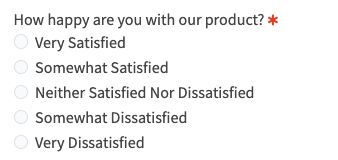
What makes the ReviewScanGo funnel unique, based on the customer’s feedback rating, the system intelligently determines the next step:
- Positive experience (Very Satisfied / Somewhat Satisfied) → Customers are given the option to leave a public review on Amazon, eBay, Walmart, Etsy, Shopify, WordPress, or your custom product page.
- Neutral or negative experience → Feedback is recorded privately for your internal use only.
This helps you:
- Encourage happy customers to leave reviews
- Identify and resolve unhappy customer issues
- Protect your brand reputation
⚙️ The Smart Review option can be enabled or disabled in your campaign settings at any time.

Learn more about how the share button works here.
4️⃣ Deliver the Free Gift #
Once customers complete the funnel, you can manage gift delivery directly from the Claims Center.
The Claims Center allows you to:
- Review submitted claims
- Verify purchase details
- Track redemption status
- Fulfill free gifts efficiently
🎥 See It in Action #
Want to see how the Smart Funnel works from a customer’s perspective?
👉 View a live Demo funnel to experience the full flow.
🌐 Works With Any Platform #
ReviewScanGo is fully compatible with:
- Amazon
- eBay
- Walmart
- Etsy
- Shopify
- WordPress
- Custom branded webstores
The Smart Funnel can be integrated with any e-commerce platform.