
Skip to content
ReviewScanGo
  • Help Center
ReviewScanGo

Getting Started

9
  • Start Here: How to Launch Your First Campaign Funnel (Overview)
  • Review Compliance
  • What Is ReviewScanGo and How the Smart Funnel Works
  • What Happens After a Customer Scans the QR Code
  • Verified vs Unverified Reviews Explained
  • Product Reviews vs Seller Feedback
  • Supported Platforms
  • Supported Countries & Marketplaces
  • Supported Languages

Campaign & Smart Funnel Setup

9
  • How to Create a Campaign
    • Adding Products
    • Creating Promotions
    • Creating Campaigns
  • Testing & Activation
    • How to Test Your Campaign Funnel
    • Campaign Status Explained
    • Common Campaign Setup Mistakes
  • QR Code Management
    • Downloading & Printing QR Codes
    • Emailing or Sharing Your Campaign Link
    • Using Existing Insert Cards

Promotions & Coupon Codes

10
  • Promotion Types
    • Gift Cards
    • eGift Cards
    • Discount Code or Promo Code or Virtual Gift Card
    • Free Products
    • Digital Download
  • Coupon Code Management
    • Entering Coupon Codes
    • How to Bulk Upload Coupon Codes
  • Gift Cards & Promo Setup
    • How to Create an Amazon Promotion in Seller Central
    • Where to Get Gift Cards or Promo Codes
    • How to Buy and Process eGift Cards

QR Codes

4
  • Downloading & Printing QR Codes
  • Emailing or Sharing Your Campaign Link
  • Using Existing Insert Cards
  • How to Test Your Campaign Funnel

Insert Cards & Compliance

4
  • Where to Get Insert Cards Made
  • Using Existing Insert Cards
  • Review Compliance
  • Amazon Compliant Insert Cards

Claims Center

2
  • How the Claims Center Works
  • How to Buy and Process eGift Cards

Branding & Advanced Features

2
  • How to White Label Your Smart Funnel
  • How to Add a Meta Pixel

Account & Billing

3
  • Upgrade or Change Your Subscription Plan
  • Plan Limits Explained
  • What Happens When You Downgrade Your Plan

Troubleshooting & Support

4
  • Campaign Not Active
  • QR Code Scans But Funnel Doesn’t Load Properly
  • Running Out of Coupon Codes
  • Contact Support
View Categories

Gift Cards

You can offer physical gift cards as part of your promotion strategy.
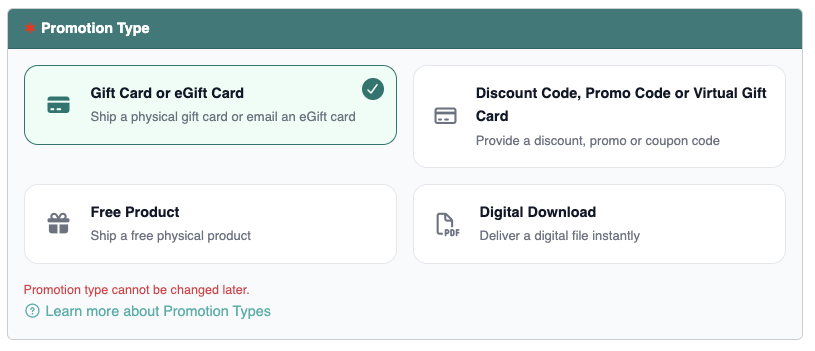
Gift cards may be purchased online or from local retail stores. Popular options include:

  • Amazon
  • Target
  • Walmart
  • Apple
  • Visa (prepaid cards)
  • Sephora
  • Starbucks
  • Uber Eats
  • DoorDash

You are responsible for purchasing and fulfilling the gift cards offered in your promotion.

How It Works #

When creating a new promotion, select the Gift Card option.

After a customer completes your Smart Funnel and qualifies for the promotion:

  • You will be notified of the redemption.
  • You can then mail the physical gift card directly to the customer.

This option is ideal for brands that prefer tangible rewards or want to provide widely recognized retail incentives.

If you prefer automated fulfillment, consider using digital gift cards or unique coupon codes instead.

Physical vs. Digital Gift Card Delivery #

When offering gift cards, you have two fulfillment options depending on how you purchase and distribute them.
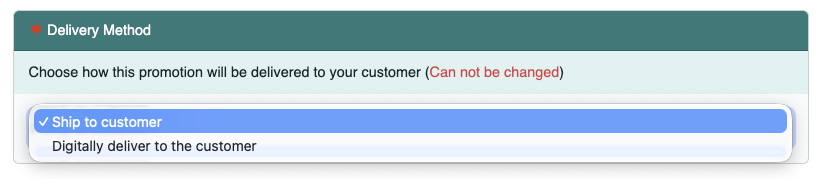
Option 1: Ship Physical Gift Cards #

If you purchase physical gift cards from a retail store or online supplier:

  • You must ship the card directly to the customer after redemption.
  • The customer will provide their shipping details during the Smart Funnel process.

This option is best suited for sellers who prefer tangible rewards or bulk-purchased physical cards.

Option 2: Deliver Physical Gift Card Details Digitally #

If your physical gift card includes a claim code, PIN, and (if applicable) expiration date, you may deliver the card details electronically via email instead of mailing the physical card.
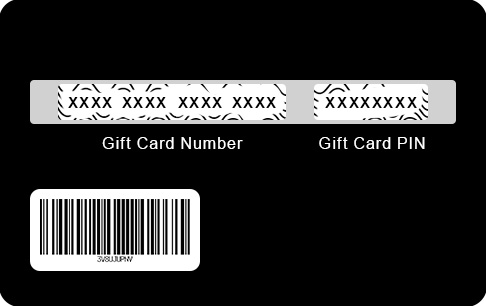
Gift Card Terms and Conditions and FAQs | Sephora

To do this, you must choose the Discount Code, Promo Code or Virtual Gift Card option and follow the instructions found here.
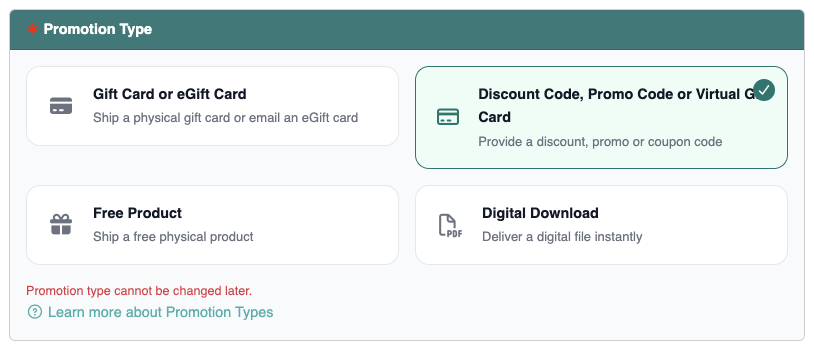
This method allows for faster fulfillment and eliminates shipping costs.

Before using digital delivery, ensure the gift card terms allow electronic distribution of the card details.

What are your Feelings

  • Happy
  • Normal
  • Sad
Table of Contents
  • How It Works
  • Physical vs. Digital Gift Card Delivery
    • Option 1: Ship Physical Gift Cards
    • Option 2: Deliver Physical Gift Card Details Digitally

© 2026 ReviewScanGo

  • Help Center