
Skip to content
ReviewScanGo
  • Help Center
ReviewScanGo

Getting Started

9
  • Start Here: How to Launch Your First Campaign Funnel (Overview)
  • Review Compliance
  • What Is ReviewScanGo and How the Smart Funnel Works
  • What Happens After a Customer Scans the QR Code
  • Verified vs Unverified Reviews Explained
  • Product Reviews vs Seller Feedback
  • Supported Platforms
  • Supported Countries & Marketplaces
  • Supported Languages

Campaign & Smart Funnel Setup

9
  • How to Create a Campaign
    • Adding Products
    • Creating Promotions
    • Creating Campaigns
  • Testing & Activation
    • How to Test Your Campaign Funnel
    • Campaign Status Explained
    • Common Campaign Setup Mistakes
  • QR Code Management
    • Downloading & Printing QR Codes
    • Emailing or Sharing Your Campaign Link
    • Using Existing Insert Cards

Promotions & Coupon Codes

10
  • Promotion Types
    • Gift Cards
    • eGift Cards
    • Discount Code or Promo Code or Virtual Gift Card
    • Free Products
    • Digital Download
  • Coupon Code Management
    • Entering Coupon Codes
    • How to Bulk Upload Coupon Codes
  • Gift Cards & Promo Setup
    • How to Create an Amazon Promotion in Seller Central
    • Where to Get Gift Cards or Promo Codes
    • How to Buy and Process eGift Cards

QR Codes

4
  • Downloading & Printing QR Codes
  • Emailing or Sharing Your Campaign Link
  • Using Existing Insert Cards
  • How to Test Your Campaign Funnel

Insert Cards & Compliance

4
  • Where to Get Insert Cards Made
  • Using Existing Insert Cards
  • Review Compliance
  • Amazon Compliant Insert Cards

Claims Center

2
  • How the Claims Center Works
  • How to Buy and Process eGift Cards

Branding & Advanced Features

2
  • How to White Label Your Smart Funnel
  • How to Add a Meta Pixel

Account & Billing

3
  • Upgrade or Change Your Subscription Plan
  • Plan Limits Explained
  • What Happens When You Downgrade Your Plan

Troubleshooting & Support

4
  • Campaign Not Active
  • QR Code Scans But Funnel Doesn’t Load Properly
  • Running Out of Coupon Codes
  • Contact Support
View Categories

How to Test Your Campaign Funnel

Before launching your campaign publicly, you can preview and test your Smart Funnel to ensure everything is configured correctly.

ReviewScanGo provides two ways to test your campaign: Preview Mode and Live Mode.

Preview Mode (Safe Testing) #

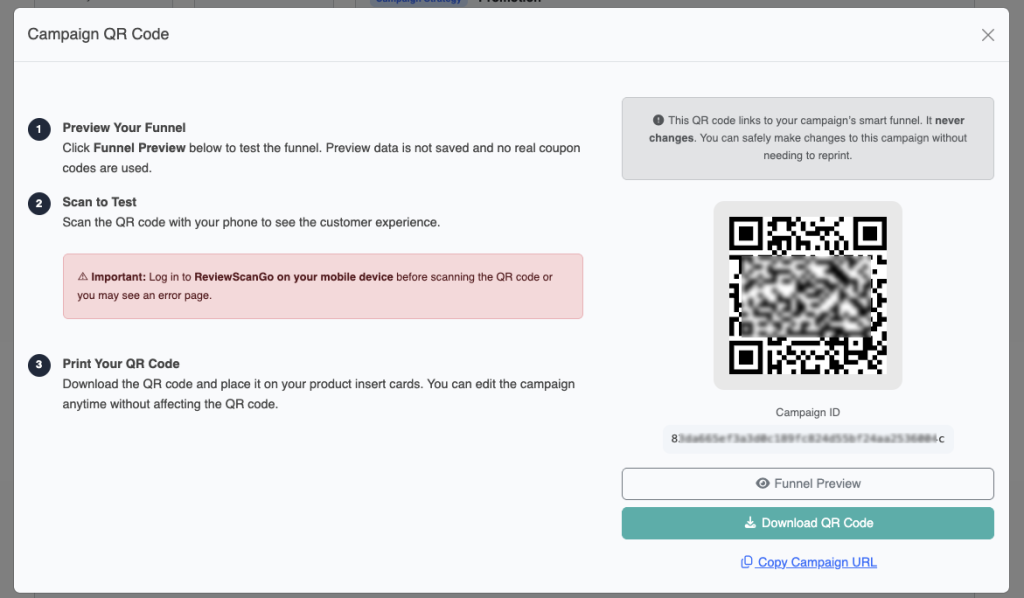
Preview Mode allows you to simulate the customer experience without affecting live data.

To access Preview Mode:

  • Go to Campaigns in your dashboard.
  • Click Preview from the campaign list, or
  • Open the campaign settings and click the Funnel Preview link.

When scanning the QR code for testing, make sure you are logged into your ReviewScanGo account on your mobile device.

In Preview Mode:

  • You can enter sample customer details.
  • You can test how the funnel collects information.
  • You can verify redirect behavior based on your campaign settings.
  • No information entered is saved.
  • No coupon codes are used.
  • No real promotions are delivered.

This is ideal for checking funnel structure, language, and review routing logic before going live.

Live Testing (Active Campaigns Only) #

To test the real, live version of your funnel:

  1. Set the campaign status to Active.
  2. Scan the campaign’s QR code using your mobile device.

Active campaigns are live and will:

  • Save customer information.
  • Deliver real coupon codes.
  • Process redemptions normally.

If you want to test how coupon codes or digital downloads are delivered, you may use a test or temporary coupon code within your promotion settings.

Important Notes #

You cannot leave reviews on your own marketplace listings. When testing redirects, ensure you are not logged into your seller account on Amazon, eBay, Walmart, or other platforms.

Campaigns set to Inactive are not live. They will not save data or issue real coupon codes.
What are your Feelings

  • Happy
  • Normal
  • Sad
Table of Contents
  • Preview Mode (Safe Testing)
  • Live Testing (Active Campaigns Only)
  • Important Notes

© 2026 ReviewScanGo

  • Help Center