
Skip to content
ReviewScanGo
  • Help Center
ReviewScanGo

Getting Started

9
  • Start Here: How to Launch Your First Campaign Funnel (Overview)
  • Review Compliance
  • What Is ReviewScanGo and How the Smart Funnel Works
  • What Happens After a Customer Scans the QR Code
  • Verified vs Unverified Reviews Explained
  • Product Reviews vs Seller Feedback
  • Supported Platforms
  • Supported Countries & Marketplaces
  • Supported Languages

Campaign & Smart Funnel Setup

9
  • How to Create a Campaign
    • Adding Products
    • Creating Promotions
    • Creating Campaigns
  • Testing & Activation
    • How to Test Your Campaign Funnel
    • Campaign Status Explained
    • Common Campaign Setup Mistakes
  • QR Code Management
    • Downloading & Printing QR Codes
    • Emailing or Sharing Your Campaign Link
    • Using Existing Insert Cards

Promotions & Coupon Codes

10
  • Promotion Types
    • Gift Cards
    • eGift Cards
    • Discount Code or Promo Code or Virtual Gift Card
    • Free Products
    • Digital Download
  • Coupon Code Management
    • Entering Coupon Codes
    • How to Bulk Upload Coupon Codes
  • Gift Cards & Promo Setup
    • How to Create an Amazon Promotion in Seller Central
    • Where to Get Gift Cards or Promo Codes
    • How to Buy and Process eGift Cards

QR Codes

4
  • Downloading & Printing QR Codes
  • Emailing or Sharing Your Campaign Link
  • Using Existing Insert Cards
  • How to Test Your Campaign Funnel

Insert Cards & Compliance

4
  • Where to Get Insert Cards Made
  • Using Existing Insert Cards
  • Review Compliance
  • Amazon Compliant Insert Cards

Claims Center

2
  • How the Claims Center Works
  • How to Buy and Process eGift Cards

Branding & Advanced Features

2
  • How to White Label Your Smart Funnel
  • How to Add a Meta Pixel

Account & Billing

3
  • Upgrade or Change Your Subscription Plan
  • Plan Limits Explained
  • What Happens When You Downgrade Your Plan

Troubleshooting & Support

4
  • Campaign Not Active
  • QR Code Scans But Funnel Doesn’t Load Properly
  • Running Out of Coupon Codes
  • Contact Support
View Categories

How to Bulk Upload Coupon Codes

Entering bulk coupon codes is only available if you select the “Discount Code, Promo Code or Virtual Gift Card” option when creating a new Promotion.

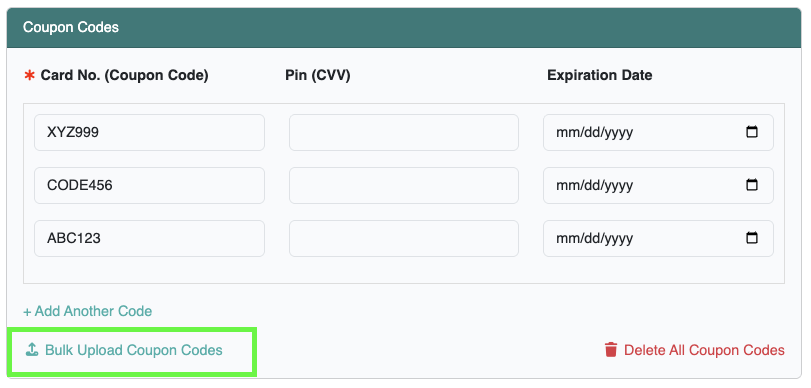
To bulk upload coupon codes, you must edit an existing Promotion and click on the Bulk Upload Coupon Codes option.

If creating a new promotion, you must follow these steps:

Step 1: Create a Promotion and save it first. Enter at least one coupon code to save the new promotion.

Step 2: Edit the promotion you just created to navigate to the promotion settings page. Then click on the Bulk Upload Coupon Codes link in the Coupon Codes section.
CSV File Formatting #

Bulk uploading coupon codes must be saved in a CSV file (Comma-Seperated Values). The CSV file must be in the following format, one coupon code per line, with each value seperated by a comma:

Coupon Code,Pin,Expiration Date (MM-DD-YYYY)

* Coupon code is required. Pin and expiration date are optional
* Bulk uploading will delete all unused coupon codes you’ve already entered into the promotion

Examples of Properly formatted CSV files #

The CSV file must be in the following format, as shown below.

Coupon Code, Pin, Expiration Date (Download Example CSV file)
G2K4-L9RM-7XPH,4567,01-01-2035
T8QY-W5ND-P4VA,8888,12-31-2030
R3ZX-K6TY-J9BQ,1852,06-30-2032

Coupon Code Only (Download Example CSV file)
G2K4-L9RM-7XPH,,
T8QY-W5ND-P4VA,,
R3ZX-K6TY-J9BQ,,

Coupon Code, Pin (Download Example CSV file)
G2K4-L9RM-7XPH,4567,
T8QY-W5ND-P4VA,8888,
R3ZX-K6TY-J9BQ,1852,

Coupon Code, Expiration Date (Download Example CSV file)
G2K4-L9RM-7XPH,,01-01-2035
T8QY-W5ND-P4VA,,12-31-2030
R3ZX-K6TY-J9BQ,,06-30-2032

*Important Note: If you are exporting your CSV from Excel or Numbers, after saving the exported CSV file, make sure to view the CSV file in a standard text editor to verify no strange or extra characters were added during the export.

Windows: You can open the CSV file with the Notepad app
Mac: You can open the CSV file with the Textedit app

If you find any problems, you can use the build-in Find & Replace feature to find the incorrect character(s) and replace or remove them with the correct character(s).

What are your Feelings

  • Happy
  • Normal
  • Sad
Table of Contents
  • CSV File Formatting
  • Examples of Properly formatted CSV files

© 2026 ReviewScanGo

  • Help Center